AMD Overview
AMD platforms support in-band monitoring and control through sensors and machine-specific registers for CPUs as well as GPUs. AMD provides and open-source stack of its drivers as well as its in-band libraries that Variorum leverages.
Requirements for AMD CPUs
Beginning with Variorum 0.5.0, AMD processors from the AMD EPYC Milan family 19h, models 0-Fh and 30h-3Fh are supported. The current port is also expected to be supported on the upcoming AMD EPYC Genoa architecture. This functionality has been tested on Linux distributions SLES15 and Ubuntu 18.04. This port depends on the AMD open-sourced software stack components listed below:
EPYC System Management Interface In-band Library (E-SMI library) available at https://github.com/amd/esmi_ib_library
AMD Energy Driver https://github.com/amd/amd_energy
HSMP driver for power metrics https://github.com/amd/amd_hsmp
The E-SMI library provides the C API for user space application of the AMD Energy Driver and the AMD HSMP modules.
The AMD Energy Driver is an out-of-tree kernel module that allows for core and
socket energy counter access through MSRs and RAPL via hwmon sys entries.
These registers are updated every millisecond and cleared on reset of the
system. Some registers of interest include:
- Power, Energy and Time Units
MSR_RAPL_POWER_UNIT/ C001_0299: shared with all cores in the socket
- Energy consumed by each core
MSR_CORE_ENERGY_STATUS/ C001_029A: 32-bitRO, Accumulator, core-level power reporting
- Energy consumed by Socket
MSR_PACKAGE_ENERGY_STATUS/ C001_029B: 32-bitRO, Accumulator, socket-level power reporting, shared with all cores in socket
The Host System Management Port (HSMP) kernel module allows for setting of power caps, boostlimits and PCIe access. It provides user level access to the HSMP mailboxes implemented by the firmware in the System Management Unit (SMU). AMD Power Control Knobs are exposed through HSMP via sysfs.
amd_hsmp/cpuX/: Directory for each possible CPUboost_limit(RW): HSMP boost limit for the core in MHz
amd_hsmp/socketX/: Directory for each possible socketboost_limit(WO): Set HSMP boost limit for the socket in MHzc0_residency(RO): Average % all cores are in C0 statecclk_limit(RO): Most restrictive core clock (CCLK) limit in MHzfabric_clocks(RO): Data fabric (FCLK) and memory (MCLK) in MHzfabric_pstate(WO): Set data fabric P-state, -1 for autonomouspower(RO): Average socket power in milliwattspower_limit(RW): Socket power limit in milliwattspower_limit_max(RO): Maximum possible value for power limit in mWproc_hot(RO): Socket PROC_HOT status (1 = active, 0 = inactive)tctl(RO): Thermal Control value (not temperature)
We expect a similar software stack to be available on the upcoming El Capitan supercomputer at Lawrence Livermore National Laboratory.
Requirements for AMD GPUs
Beginning with Variorum 0.6.0, we support AMD Radeon Instinct GPUs with the help of the Radeon Open Compute management (ROCm) stack. The Variorum AMD GPU port currently requires ROCm System Management Interface (ROCm-SMI) v5.2.0, and supports various AMD GPUs including (but not limited) to MI50, MI60, MI100, and MI200. Future versions on ROCm-SMI are expected to be backward compatible, and upcoming AMD GPU hardware for El Capitan supercomputer is expected to be supported through ROCm-SMI as well.
Requirements for AMD APUs
Variorum also supports AMD’s Accelerated Processing Units (APUs), which combine
CPU and GPU compute on a single package, starting with the MI300A. This port
uses the AMD SMI library (amd_smi), the
successor to ROCm-SMI, to query power, energy, and thermal telemetry from the
device.
Building the AMD APU port requires a ROCm install that provides the AMD SMI
library and headers (amd_smi/amdsmi.h and libamd_smi.so), which can be
pointed to with the ROCM_DIR CMake variable, or auto-detected if AMD SMI is
already on the system’s include and library paths.
Architecture detection queries the board information of the first GPU/APU device through the AMD SMI API and identifies MI300A-class hardware by its product name; if AMD SMI cannot be queried, Variorum defaults to treating the device as an MI300A.
Currently, the AMD APU port implements monitoring for energy, power, and thermals. Support for clock frequency, power capping, and GPU utilization queries is stubbed out and planned for a future release.
Monitoring and Control Through AMD SMI API
Variorum interfaces with AMD’s AMD SMI library for obtaining power, energy, and thermal information for APUs. These AMD SMI APIs are described below.
amdsmi_init/amdsmi_shut_down: Initialize and tear down the AMD SMI library for the AMD GPU/APU device class.amdsmi_get_socket_handles: Get the number of sockets and their handles on the system.amdsmi_get_processor_handles: Get the handles of the processors (GPU or APU devices) attached to a given socket.amdsmi_get_gpu_board_info: Get board-level information for a device, including product name, used by Variorum to identify MI300A hardware.amdsmi_get_power_info: Get the current power consumption of an APU device in microwatts.amdsmi_get_energy_count: Get the accumulated energy counter for an APU device in microjoules, along with its counter resolution and a timestamp in nanoseconds.amdsmi_get_temp_metric: Get the temperature metric value for a specified sensor (Edge, Junction/Hotspot, or VRAM/HBM) on an APU device, in millidegrees Celsius.
Monitoring and Control Through E-SMI API
Variorum interfaces with AMD’s E-SMI library for obtaining power and energy information. These E-SMI APIs are described below.
The built-in monitoring interface on the AMD EPYC™ processors is implemented by the SMU FW. All registers are updated every 1 millisecond.
Power telemetry
esmi_socket_power_get(): Instantaneous power is reported in milliwattsesmi_socket_power_cap_get()andesmi_socket_power_cap_set(): Get and Set power limit of the socket in milliwattsesmi_socket_power_cap_max_get(): Maximum Power limit of the socket in milliwatts
Boostlimit telemetry
Boostlimit is a maximum frequency a CPU can run at.
esmi_core_boostlimit_get()andesmi_core_boostlimit_set(): Get and set the current boostlimit for a given coreesmi_socket_boostlimit_set(): Set boostlimit for all the cores in the socket
Energy telemetry
esmi_socket_energy_get(): Get software accumulated 64-bit energy counter for a given socketesmi_core_energy_get(): Get software accumulated 64-bit energy counter for a given core
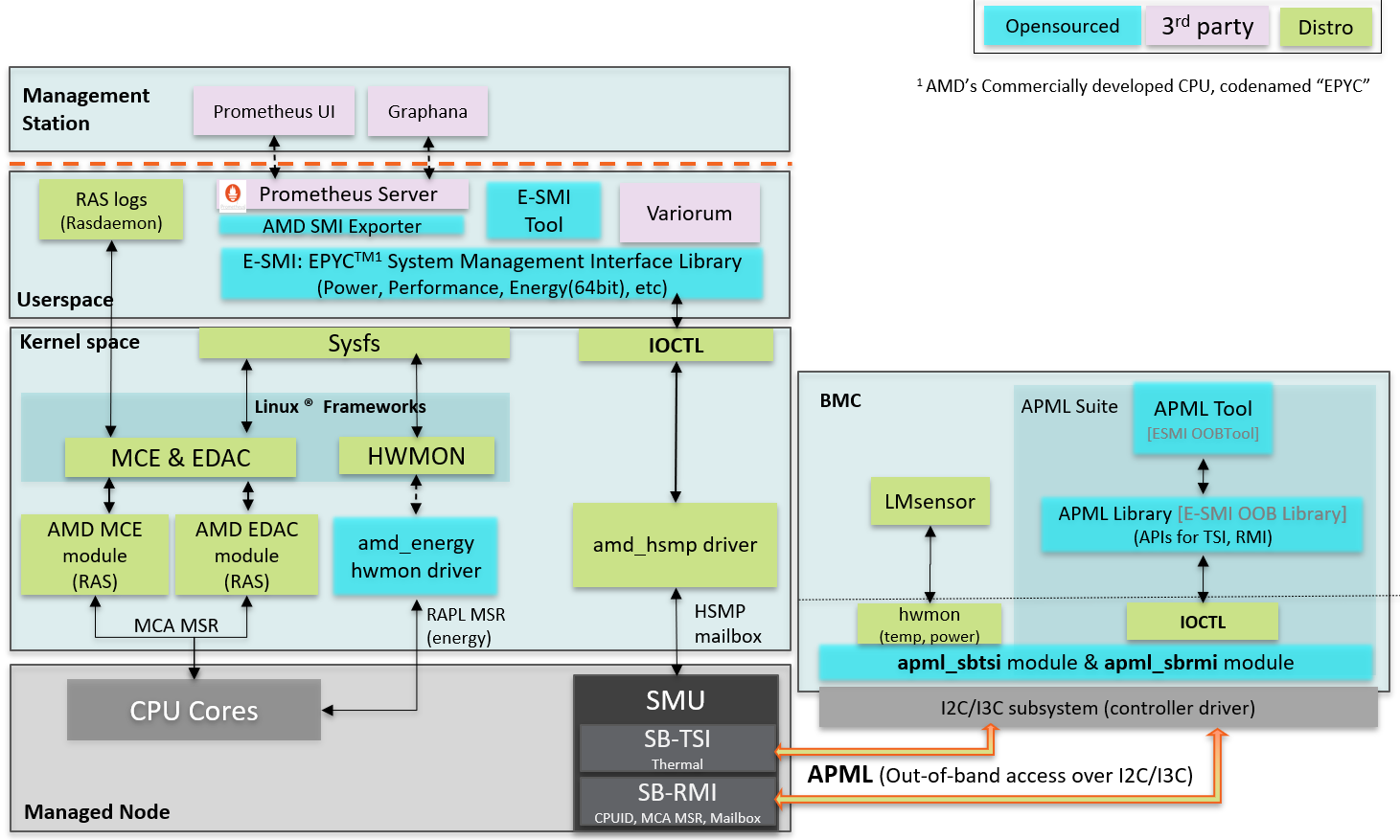
Details of the AMD E-SMS CPU stack can be found on the AMD Developer website. We reproduce a figure from this stack below.
Monitoring and Control Through ROCM-SMI API
Variorum interfaces with AMD’s ROCm-SMI library for obtaining power and energy information for GPUs. These ROCm-SMI APIs are described below.
rsmi_num_monitor_devices: Get the number of GPU devices.rsmi_dev_power_ave_get: Get the current average power consumption of a GPU device over a short time window in microwatts.rsmi_dev_power_cap_get: Get the current power cap in microwatts on a GPU device which, when reached, causes the system to take action to reduce power.rsmi_dev_power_cap_range_get: Get the range of valid values for the power cap, including the maximum possible and the minimum possible cap on a GPU device.rsmi_dev_temp_metric_get: Get the temperature metric value for the specified metric and sensor (e.g. Current or Max temperature), from the GPU device.rsmi_dev_gpu_clk_freq_get: Get the list of possible system clock speeds for a GPU device for a specified clock type (e.g. Graphics or Memory clock).rsmi_utilization_count_get: Get coarse grain utilization counter of the specified GPU device, including graphics and memory activity counters.rsmi_dev_power_cap_set: Set the GPU device power cap for the specified GPU device in microwatts.